

Introduction
Web development has become an important part of the modern technology industry. Websites and web applications are used by businesses, startups, educational institutions, financial organizations, e-commerce companies, software companies, and millions of individuals around the world.
For someone starting from zero, however, web development can feel overwhelming. There are programming languages, frameworks, databases, APIs, development tools, hosting platforms, cloud services, and many other technologies to understand.
A common beginner question is: “Where should I start?”
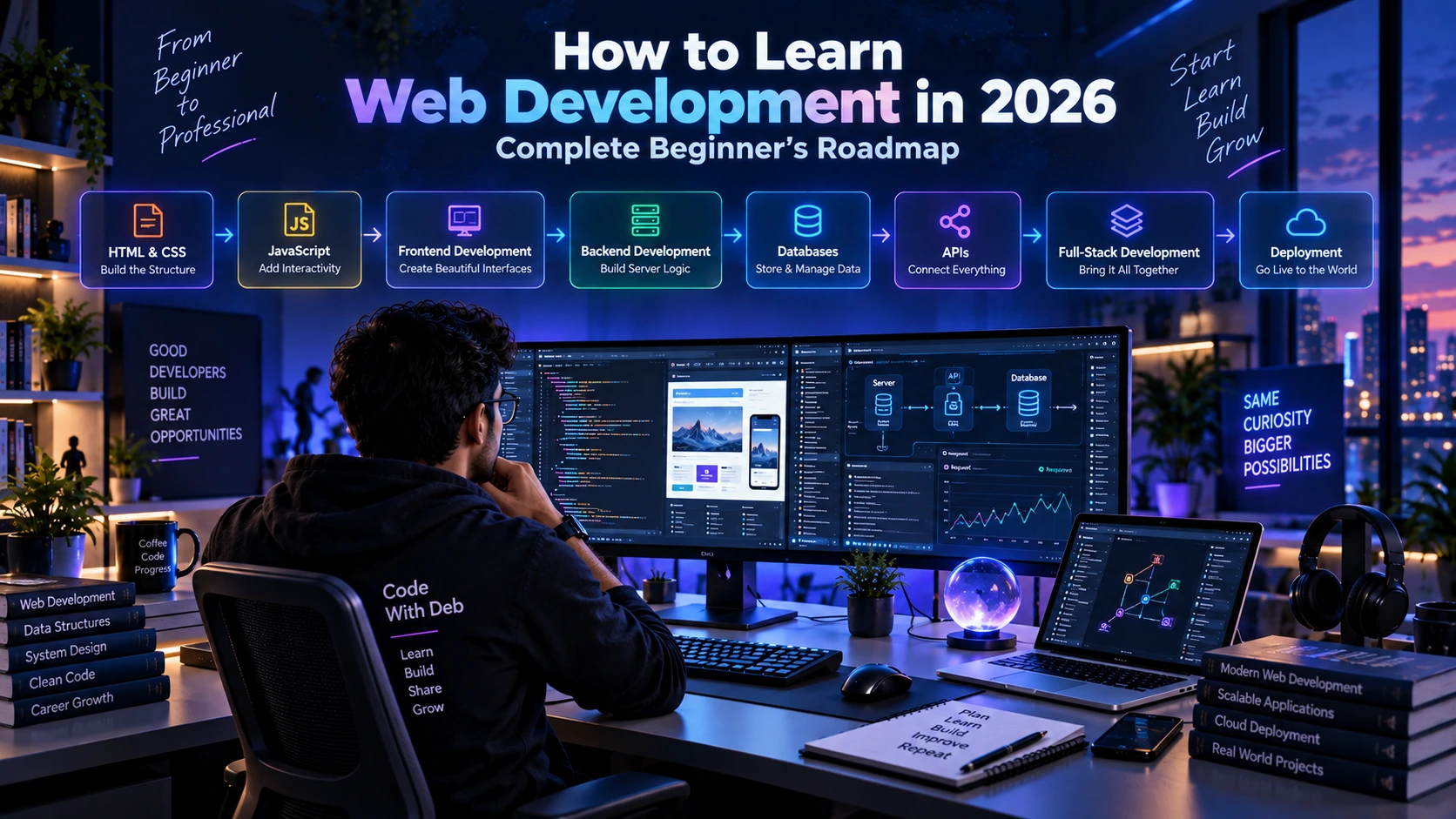
The good news is that you do not need to learn everything at once. A structured learning path can make the process much easier. By starting with the fundamentals and gradually moving toward frontend, backend, databases, APIs, deployment, and real-world projects, you can build a strong foundation for a web development career.
In this guide, we will explore a complete Web Development Roadmap for 2026, designed especially for beginners who want to understand what to learn, why they should learn it, and how the different technologies fit together.
What Is Web Development?
Web development is the process of creating and maintaining websites and web applications that run on the internet or private networks.
A simple website might contain a homepage, about page, services page, blog, and contact form. A modern web application can be much more complex and may include user accounts, authentication, dashboards, databases, payment systems, APIs, notifications, search functionality, and real-time features.
Web development can generally be divided into three major areas: frontend development, backend development, and full-stack development.
Frontend development focuses on what users see and interact with. Backend development handles server-side logic, APIs, databases, authentication, and application functionality. Full-stack development combines both frontend and backend development.
Understanding this difference is one of the first things beginners should learn.
How Does a Website Work?
Before learning advanced frameworks, it is useful to understand how a basic website works.
When you enter a website address into a browser, the browser sends a request to a server. The server processes that request and returns the required files or information.
The browser then interprets technologies such as HTML, CSS, and JavaScript and displays the result to the user.
For a simple static website, the browser may primarily work with HTML, CSS, and JavaScript files. A dynamic application usually involves a frontend communicating with a backend through APIs, while the backend communicates with a database.
A simplified architecture looks like this:
User → Browser → Frontend → Backend/API → Database → Backend → Frontend → User
As you progress in web development, understanding this complete flow will become increasingly important.
Step 1: Learn HTML
HTML, or HyperText Markup Language, is one of the fundamental technologies of the web.
HTML provides the structure of a webpage. It is used to create headings, paragraphs, links, images, lists, tables, forms, buttons, navigation sections, and other page elements.
Beginners should first understand how HTML documents are structured and how different elements are used to organize content.
Important topics include HTML elements, attributes, headings, paragraphs, links, images, lists, tables, forms, semantic HTML, multimedia, and basic accessibility.
You do not need to memorize every HTML element. The important goal is to understand how HTML structures information on a webpage.
A good first project is a simple personal profile or portfolio page.
Step 2: Learn CSS
After HTML, the next step is learning CSS.
CSS, or Cascading Style Sheets, controls the visual appearance of webpages. It allows developers to work with colors, fonts, spacing, layouts, borders, backgrounds, animations, and responsive designs.
Important CSS concepts include selectors, the box model, margins, padding, positioning, colors, typography, Flexbox, CSS Grid, media queries, transitions, and animations.
One particularly important skill is responsive web design.
A website should work properly on desktops, laptops, tablets, and smartphones. Learning responsive layouts early will help you build websites that provide a better experience across different devices.
Step 3: Learn JavaScript
Once you have a good understanding of HTML and CSS, JavaScript should become your next major focus.
JavaScript adds behavior and interactivity to websites. It can respond to user actions, manipulate webpage content, validate forms, communicate with APIs, process data, and power complete applications.
Important JavaScript concepts include variables, data types, operators, conditions, loops, functions, arrays, objects, strings, DOM manipulation, events, modules, error handling, promises, asynchronous programming, async/await, and API requests.
A strong JavaScript foundation is extremely useful because many modern frontend technologies are built around JavaScript concepts.
Instead of rushing into a framework, spend time understanding JavaScript properly.
Step 4: Learn Git and GitHub
After learning the basic web technologies, you should understand version control.
Git is a version control system that allows developers to track changes in their code. It is useful for individual projects as well as team development.
GitHub is a popular platform for hosting Git repositories and collaborating on software projects.
You should understand repositories, commits, branches, merging, cloning, pushing, pulling, pull requests, and basic conflict resolution.
Start uploading your projects to GitHub as you learn. Over time, your GitHub profile can become an important part of your developer portfolio.
Step 5: Learn Frontend Development
Once you understand HTML, CSS, and JavaScript, you can move into modern frontend development.
Frontend development involves creating interactive user interfaces that run in a browser.
You can learn technologies such as React and later explore Next.js or other modern frontend frameworks depending on your goals.
If you choose React, important concepts include components, props, state, hooks, events, forms, Context API, routing, API integration, authentication, state management, and performance optimization.
The most important thing is to choose one technology and learn it properly rather than trying to learn every frontend framework simultaneously.
Step 6: Learn Backend Development
After becoming comfortable with frontend development, you can begin learning backend development.
Backend development handles the server-side part of an application. It is responsible for processing requests, implementing business logic, communicating with databases, managing authentication, and providing APIs.
There are several backend technologies you can choose from.
For example, JavaScript developers can use Node.js and Express.js, while Java developers can use Java and Spring Boot.
Your backend learning path should include server fundamentals, routing, REST APIs, request and response handling, authentication, authorization, validation, error handling, database integration, security basics, and deployment.
Step 7: Learn Databases
Most real-world applications need a database to store information.
For example, an e-commerce application may need to store users, products, orders, and other information. A social platform may need profiles, posts, comments, and messages.
You should understand both the basic concepts of relational and NoSQL databases.
Popular relational databases include MySQL and PostgreSQL. MongoDB is a widely used NoSQL database.
Important database concepts include tables or collections, records, relationships, queries, CRUD operations, indexing, database design, and basic performance considerations.
You do not need to learn every database immediately. Start with one database and build projects around it.
Step 8: Learn REST APIs
APIs allow different software systems to communicate with one another.
Modern frontend applications frequently communicate with backend applications through APIs.
You should understand HTTP methods such as GET, POST, PUT, PATCH, and DELETE. You should also understand status codes, request headers, request bodies, query parameters, route parameters, JSON, authentication, and API error handling.
Once you understand these concepts, build your own REST APIs and connect them to frontend applications.
For example, you could build a task-management application where the frontend communicates with a backend API to create, read, update, and delete tasks.
Step 9: Learn Authentication and Authorization
Authentication and authorization are important concepts in modern web applications.
Authentication answers the question:
“Who is this user?”
Authorization answers:
“What is this user allowed to access?”
For example, a normal user may be able to access their own profile, while an administrator may have access to a complete admin dashboard.
You should understand login and registration, password security, sessions, tokens, protected routes, user roles, permissions, and basic application security.
Security should be considered from the beginning rather than treated as something to add later.
Step 10: Learn Deployment
Creating an application on your local computer is only one part of web development.
You also need to understand how to make your application accessible to other users through the internet.
Deployment involves concepts such as hosting, domains, DNS, SSL, environment variables, build processes, databases, server configuration, monitoring, and backups.
Depending on your technology stack, you may work with platforms such as Vercel, Render, AWS, or other hosting and cloud services.
Try to deploy your projects instead of keeping everything only on your local computer.
A live project can also become an important part of your portfolio.
Learn Responsive Web Design
Responsive design allows websites to adapt to different screen sizes.
Users may access a website from a large desktop monitor, laptop, tablet, or smartphone. Your layout should remain usable across these devices.
Important concepts include Flexbox, CSS Grid, media queries, flexible units, responsive images, mobile navigation, and mobile-friendly layouts.
Always test your website on multiple screen sizes before considering a project complete.
Learn Web Accessibility
Accessibility is another important aspect of professional web development.
A website should be usable by as many people as reasonably possible, including users who rely on assistive technologies.
Beginners should understand semantic HTML, appropriate heading structures, descriptive links, accessible forms, meaningful ALT text, keyboard navigation, and readable visual design.
Accessibility should be considered during development rather than treated as an afterthought.
Learn Basic Web Security
Every developer should understand basic web security concepts.
You should learn about secure password handling, input validation, authentication security, authorization, HTTPS, environment variables, secure API practices, dependency updates, and common web security risks.
You do not need to become a cybersecurity expert to start developing websites, but security awareness is an important part of professional development.
Which Technology Stack Should You Learn?
One of the biggest challenges for beginners is deciding which technology stack to choose.
There is no single stack that is perfect for every person or every project.
A JavaScript-focused roadmap could look like:
HTML → CSS → JavaScript → React → Next.js → Node.js → Express.js → Database → APIs → Deployment
A Java-focused backend roadmap could look like:
HTML → CSS → JavaScript → Java → OOP → SQL → Spring → Spring Boot → REST APIs → Microservices → Deployment
You can also choose other ecosystems based on your interests and career goals.
The important thing is to avoid learning multiple unrelated technologies at the same time. Build a strong foundation first and expand gradually.
What Projects Should Beginners Build?
Projects are one of the most important parts of learning web development.
Reading tutorials can teach you concepts, but building projects teaches you how to solve problems and connect different technologies.
Beginner Projects
Start with relatively simple projects such as a personal portfolio, calculator, responsive landing page, to-do application, weather application, simple blog interface, or contact form.
These projects help you practice HTML, CSS, JavaScript, responsive design, and basic application logic.
Intermediate Projects
After gaining confidence, build projects such as an expense tracker, task management application, blog platform, e-commerce frontend, job portal, movie application, or developer dashboard.
These projects can introduce APIs, databases, authentication, routing, and application architecture.
Advanced Projects
Once you are comfortable with full-stack development, consider building applications such as an e-commerce platform, learning management system, job portal, SaaS application, project management system, or business management platform.
Advanced applications can include authentication, role-based access, databases, APIs, dashboards, payment integration, notifications, deployment, and monitoring.
Why Building Projects Is Important
One of the biggest mistakes beginners make is spending too much time watching tutorials without actually building applications.
Tutorials are useful for learning concepts, but professional development requires problem-solving.
After learning something, try to build a small project without following a tutorial line by line.
You will make mistakes. Your code will sometimes fail. You will encounter errors that you do not immediately understand.
That is completely normal.
Learning how to investigate errors, read documentation, search for solutions, test different approaches, and debug problems is an important part of becoming a developer.
Build Your Developer Portfolio
Once you have several meaningful projects, create a professional portfolio website.
Your portfolio should clearly explain who you are, what technologies you know, what projects you have built, and how someone can contact you.
You can include your introduction, technical skills, projects, education, experience, GitHub profile, LinkedIn profile, and contact information.
Instead of listing dozens of technologies, focus on showing projects that demonstrate your actual skills.
Build Your GitHub Profile
GitHub can be an important part of your developer presence.
Keep your repositories organized and use meaningful project names. Add README files explaining the project, technologies used, important features, installation steps, and usage information.
Whenever possible, include screenshots and live demonstrations.
A well-organized GitHub profile can help demonstrate your practical development experience.
Learn to Read Documentation
Professional developers cannot memorize everything.
Even experienced developers regularly use official documentation when working with programming languages, frameworks, APIs, libraries, databases, and cloud services.
Learning how to read documentation is therefore an important skill.
When you encounter a problem, try to understand the official documentation and underlying concept instead of simply copying an answer.
This approach helps you become more independent as a developer.
Learn Debugging
Debugging is a fundamental software development skill.
Your application will eventually contain errors. Sometimes the problem will be simple, while other issues may require detailed investigation.
Learn how to read error messages, inspect variables, use browser developer tools, reproduce problems, isolate issues, use appropriate logging, and test possible solutions.
The better you become at debugging, the more confidently you can work on real-world applications.
Common Mistakes Beginners Should Avoid
One common mistake is trying to learn too many technologies simultaneously. Starting JavaScript, React, Python, Java, Node.js, Docker, AWS, and many other technologies at the same time can create unnecessary confusion.
Another mistake is focusing entirely on courses and certificates without building practical projects. Courses can provide structure, but projects help you develop actual problem-solving skills.
Copying projects without understanding the code is another common problem. You may be able to complete a tutorial, but you will struggle when you need to modify or debug the application yourself.
Ignoring fundamentals can also create difficulties later. Frameworks change frequently, while fundamental concepts such as programming logic, HTTP, databases, APIs, and software architecture remain useful.
How Long Does It Take to Learn Web Development?
There is no universal timeline for learning web development.
Your learning speed depends on your previous experience, study schedule, practice routine, project complexity, and career goals.
A beginner who studies consistently can build a foundation over several months, while becoming comfortable with full-stack development generally requires significantly more practice and real-world project experience.
Instead of focusing only on how quickly you can finish the roadmap, focus on whether you actually understand the concepts and can use them independently.
A Simple Web Development Roadmap
If you want a straightforward learning sequence, follow this progression:
Phase 1: Learn HTML and basic web concepts.
Phase 2: Learn CSS, layouts, Flexbox, Grid, and responsive design.
Phase 3: Learn JavaScript fundamentals and browser concepts.
Phase 4: Learn Git and GitHub.
Phase 5: Learn a modern frontend technology such as React.
Phase 6: Learn backend development using Node.js, Java/Spring Boot, Python, or another suitable technology.
Phase 7: Learn databases.
Phase 8: Learn REST APIs and authentication.
Phase 9: Learn testing, debugging, security, and application architecture.
Phase 10: Learn deployment, domains, hosting, and cloud basics.
Phase 11: Build real-world projects.
Phase 12: Create your portfolio, resume, GitHub profile, and professional online presence.
This roadmap can be adjusted according to your career goals.
How to Prepare for a Web Development Career
Learning technologies is only one part of becoming job-ready.
You should also learn how to present your skills professionally.
Create a clear resume that highlights your skills, projects, education, experience, and achievements. Build a professional LinkedIn profile and keep your portfolio updated.
For technical interviews, revise programming fundamentals, your primary programming language, databases, APIs, web concepts, data structures, and the technologies used in your projects.
Most importantly, understand every project mentioned on your resume. Interviewers may ask why you selected a particular technology, how the application works, what problems you encountered, and how you solved them.
Web Development Career Opportunities
Web development knowledge can lead to different technology career paths.
Depending on your interests and skills, you can explore roles such as Frontend Developer, Backend Developer, Full-Stack Developer, Web Developer, Java Developer, React Developer, Node.js Developer, Software Engineer, Web Application Developer, WordPress Developer, or Software Development Engineer.
Some developers also explore freelancing, consulting, startup development, SaaS products, or independent projects.
You do not have to decide your entire career path at the beginning. Your interests can become clearer as you gain experience.
Final Advice for Beginners
The most important thing is consistency.
You do not need to study for many hours every day. A focused and regular learning routine can produce meaningful progress over time.
Learn a concept, practice it, build something, make mistakes, debug those mistakes, and repeat the process.
Do not be afraid of errors. Errors are a normal part of software development, and learning how to solve them is one of the most valuable skills you can develop.
Do not try to learn every technology simply because it is popular. Build strong fundamentals first and then learn technologies that support your goals.
Most importantly, keep building.
Frequently Asked Questions
Can I learn web development without a computer science degree?
Yes. A computer science degree can provide useful foundational knowledge, but web development can also be learned through structured self-learning, courses, documentation, practice, and real-world projects.
Should I learn HTML before JavaScript?
Yes. HTML provides the structure of a webpage, CSS controls its presentation, and JavaScript adds behavior and interactivity. Learning these technologies in this order provides a strong foundation.
Should I learn CSS before JavaScript?
Learning basic HTML and CSS before moving deeply into JavaScript is generally helpful because modern web applications use all three technologies together.
Should I learn React immediately?
It is better to develop a reasonable understanding of HTML, CSS, and JavaScript first. A strong JavaScript foundation will make React concepts easier to understand.
Is JavaScript enough for web development?
JavaScript can be used for both frontend and backend development, but professional web applications usually require additional knowledge such as databases, APIs, authentication, deployment, testing, and security.
Conclusion
Learning web development in 2026 does not mean trying to learn every programming language, framework, and tool available.
The better approach is to build a strong foundation and progress step by step.
Start with HTML and CSS. Learn JavaScript properly. Understand Git and GitHub. Move into frontend development, then learn backend development, databases, APIs, authentication, security, and deployment.
As you progress, build real projects and publish them through GitHub and your portfolio. Use those projects to demonstrate what you can actually build rather than simply listing technologies on your resume.
The most valuable skill is not knowing the largest number of technologies. It is being able to understand problems, write and maintain code, debug errors, learn new tools, and build useful solutions.
Technology will continue to evolve. Frameworks will change, new AI tools will appear, and new development platforms will emerge. Strong fundamentals will help you adapt to those changes.
If you are beginning your web development journey in 2026, start small, practice consistently, build real projects, and keep improving.
Learn. Build. Improve. Share.